Keyboard ears: build an AI that hears which key you pressed
Reel 43 · full breakdown · October 27, 2026
THE 60-SECOND VERSION
- Every key sits in a different spot, so each one sounds a little different when you press it.
- Turn one press into a picture of its sound (a spectrogram) and an ordinary image AI can learn which picture is which key.
- In the study: 95% of keys right recorded by a phone next to the laptop, 93% recorded over Zoom.
- The catch: it was trained on keystrokes from the same kind of laptop. Other keyboards weren't tested.
01 · 4 details
What the study did
Data
36 keys on a MacBook Pro, each pressed 25 times, recorded by an iPhone 13 mini 17 cm away, and again over Zoom.
Pictures
Each press was cut out and turned into a mel-spectrogram: time left to right, pitch bottom to top, louder = brighter.
Model
An image classifier (CoAtNet) learned to match each picture to its key. Accuracy is per keystroke: did its first guess name the right key.
What it didn't do
It classified single key presses. Recovering a whole password from a stream of typing wasn't part of the experiment.
02 · 3 tips
How to protect yourself
Mute when you type a password on a call
The Zoom result came from the call's own audio.
Let a password manager or biometrics fill it in
No typing, no keystroke sound.
Use long random passwords
The study suggests mixed case is harder to recover: no one has shown how to hear when Shift is released.
Good to know
- Build this only on your own keyboard, with your own recordings. Recording other people's typing without consent is illegal in many places.
Sources
A small version of the study you can run on a laptop: record your own keys, turn each press into a picture, train a model, test it. About an hour.
The guide · 6 parts
- 01
What the AI actually sees
Stills from the reel. Every picture is computed from real laptop keystroke recordings, not drawn by hand.
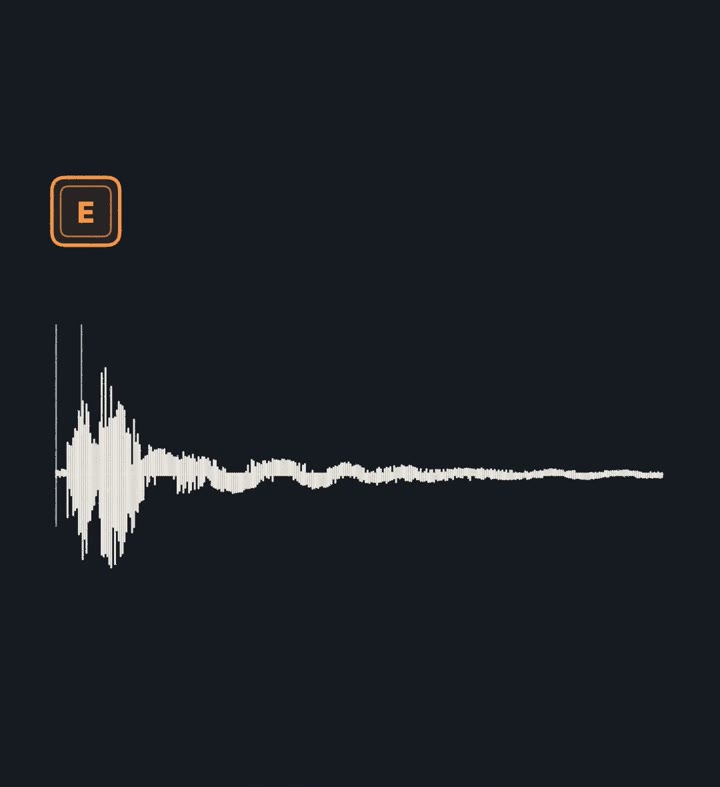
One click, cut into slices 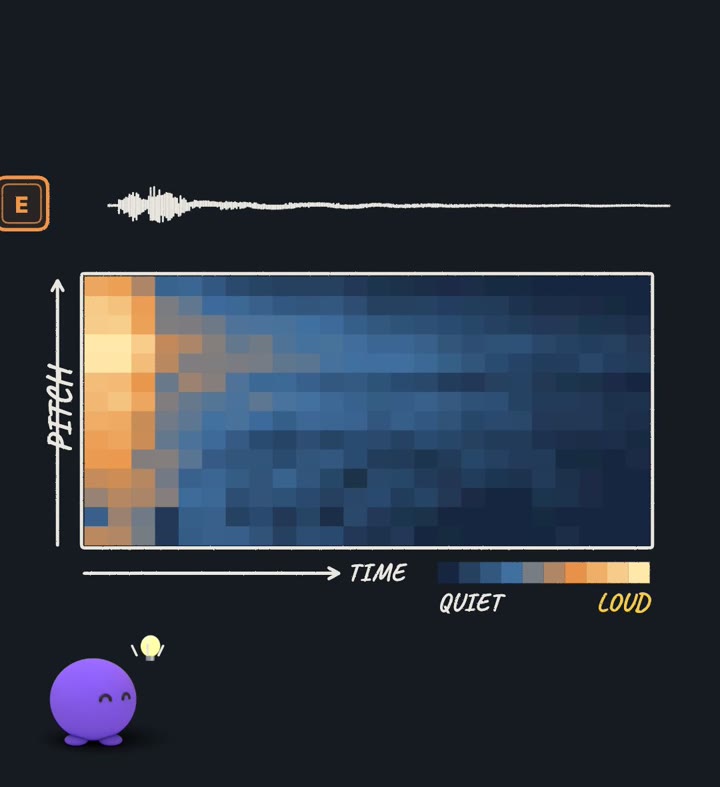
The click as a picture (spectrogram) 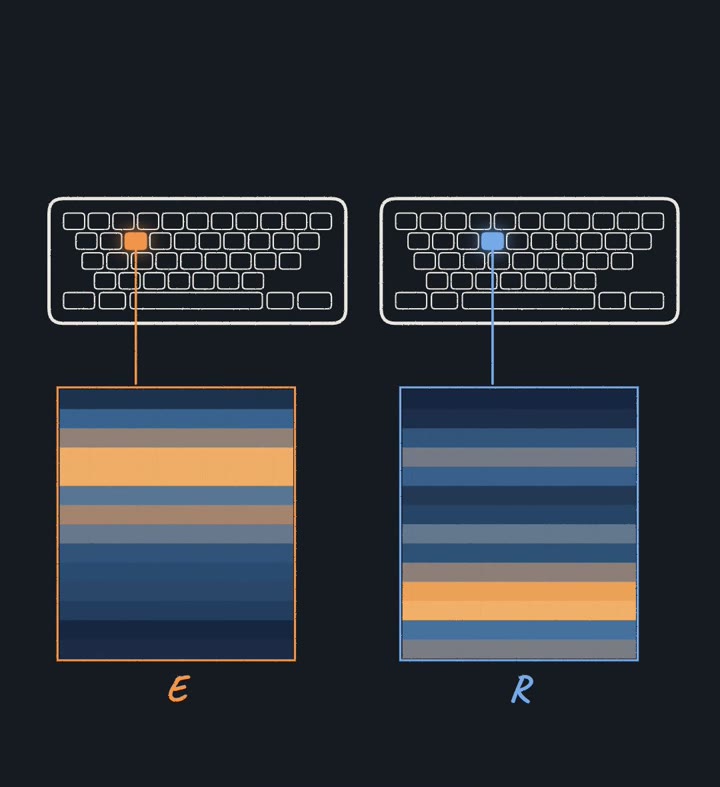
E and R leave different stripes 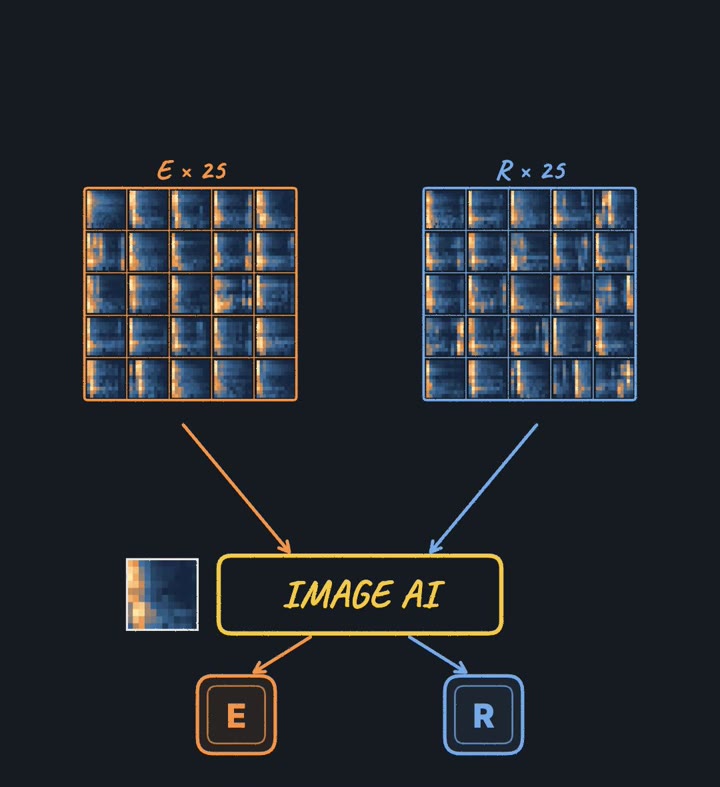
25 pictures per key → an image model - 02
1. Record your own keyboard
- Pick a few keys to start (for example e, r, t, a, s).
- Put your phone or a mic about 15–20 cm from the keyboard in a quiet room.
- For each key, record one file and press that key about 25 times, half a second apart. Save it as the key's name: e.wav, r.wav, …
- Put the files in one folder called recordings/.
- 03
2. Install
- 04
3. Run the build
The script cuts out every press by its energy, keeps 0.33 s of each (the length the study used), turns it into a 64×64 mel-spectrogram, trains a classifier on 80% of the presses and tests it on the other 20%.
keyboard_ears.py"""Keyboard ears — hear which key was pressed (a small version of the 2023 acoustic side-channel study). Record your OWN keyboard only. Steps: 1) one WAV per key with ~25 presses, 2) cut the presses, 3) turn each press into a mel-spectrogram picture, 4) train a classifier, 5) test it. python keyboard_ears.py recordings/ # recordings/e.wav, recordings/r.wav, ... (file name = the key) Needs: pip install numpy librosa scikit-learn """ import sys from pathlib import Path import librosa import numpy as np from sklearn.linear_model import LogisticRegression from sklearn.metrics import accuracy_score, confusion_matrix from sklearn.model_selection import train_test_split from sklearn.preprocessing import StandardScaler from sklearn.pipeline import make_pipeline SR = 44100 # sample rate CLIP = 0.33 # seconds kept per key press (the study used 0.33 s) N_MELS = 64 # pitch bands in the picture def split_presses(y, sr=SR, clip=CLIP): """Find each key press by its energy and cut a fixed-length clip starting just before it.""" hop = int(0.005 * sr) energy = np.array([np.sqrt(np.mean(y[i:i + hop] ** 2)) for i in range(0, len(y) - hop, hop)]) threshold = np.percentile(energy, 90) presses, last = [], -10 ** 9 for i in range(1, len(energy)): start = i * hop if energy[i] > threshold >= energy[i - 1] and start - last > clip * sr: seg = y[max(0, start - int(0.005 * sr)): start + int(clip * sr)] if len(seg) == int(clip * sr) + int(0.005 * sr): presses.append(seg) last = start return presses def to_picture(clip, sr=SR): """One press → a 64×64 mel-spectrogram (time left→right, pitch bottom→top, brighter = louder).""" mel = librosa.feature.melspectrogram(y=clip, sr=sr, n_fft=1024, hop_length=225, n_mels=N_MELS) db = librosa.power_to_db(mel, ref=np.max) cols = np.linspace(0, db.shape[1] - 1, 64).astype(int) # resample time to 64 columns return db[:, cols] def load(folder): X, labels = [], [] for wav in sorted(Path(folder).glob("*.wav")): y, _ = librosa.load(wav, sr=SR, mono=True) for clip in split_presses(y): X.append(to_picture(clip).ravel()) labels.append(wav.stem) print(f"{wav.stem}: {labels.count(wav.stem)} presses") return np.array(X), np.array(labels) if __name__ == "__main__": X, y = load(sys.argv[1] if len(sys.argv) > 1 else "recordings") X_tr, X_te, y_tr, y_te = train_test_split(X, y, test_size=0.2, stratify=y, random_state=0) model = make_pipeline(StandardScaler(), LogisticRegression(max_iter=2000)) model.fit(X_tr, y_tr) pred = model.predict(X_te) print(f"accuracy on held-out presses: {accuracy_score(y_te, pred):.0%}") keys = sorted(set(y.tolist())) print("confusion (rows = true key, columns = guess):", keys) print(confusion_matrix(y_te, pred, labels=keys)) - 05
4. Read the result
- It prints how many presses it found per key. If a number is far from 25, press more slowly or move the mic closer.
- Then the accuracy on presses it never saw, and a confusion table: rows are the true key, columns its guess.
- Keys next to each other are the easiest to confuse. Add more presses per key before adding more keys.
- 06
5. Go further: the study's image model
The study trained an image model (CoAtNet) on the pictures instead of a linear classifier. With PyTorch and the timm library you can do the same on the 64×64 pictures from step 3; it needs a GPU to train in reasonable time. We haven't run this part ourselves, so treat it as a starting point.
Good to know
- The script was run end to end on test recordings before publishing. Your accuracy depends on your keyboard, mic and room.
- By @copilot_shogo. Not affiliated with the study's authors or their universities.
Free for people building with Claude Code
Two of us run a six‑figure business on this Claude Code setup.
Most setups forget who you are every session. This one knows your goal, pushes back when you drift, and checks its own work. Take the starter version. It takes 15 minutes to set up.
✻
CLAUDE.md
- START-HERE.md
- CLAUDE.md
- prompts/interview.md
- agents/verifier.md
- diagnostic.md
Confirm your email and the download starts. One email a week after that, unsubscribe any time.
MORE LIKE THIS